Plugins
Two Figma plugins built to solve repetitive workflow problems I kept running into myself.
Role:
Product Designer & Builder
Tools:
Figma, Figma Plugin API, TypeScript, Cursor
Category:
UX, Design Tools, Experimentation, Design Engineering


Overview
Turning everyday Figma friction into useful tools.
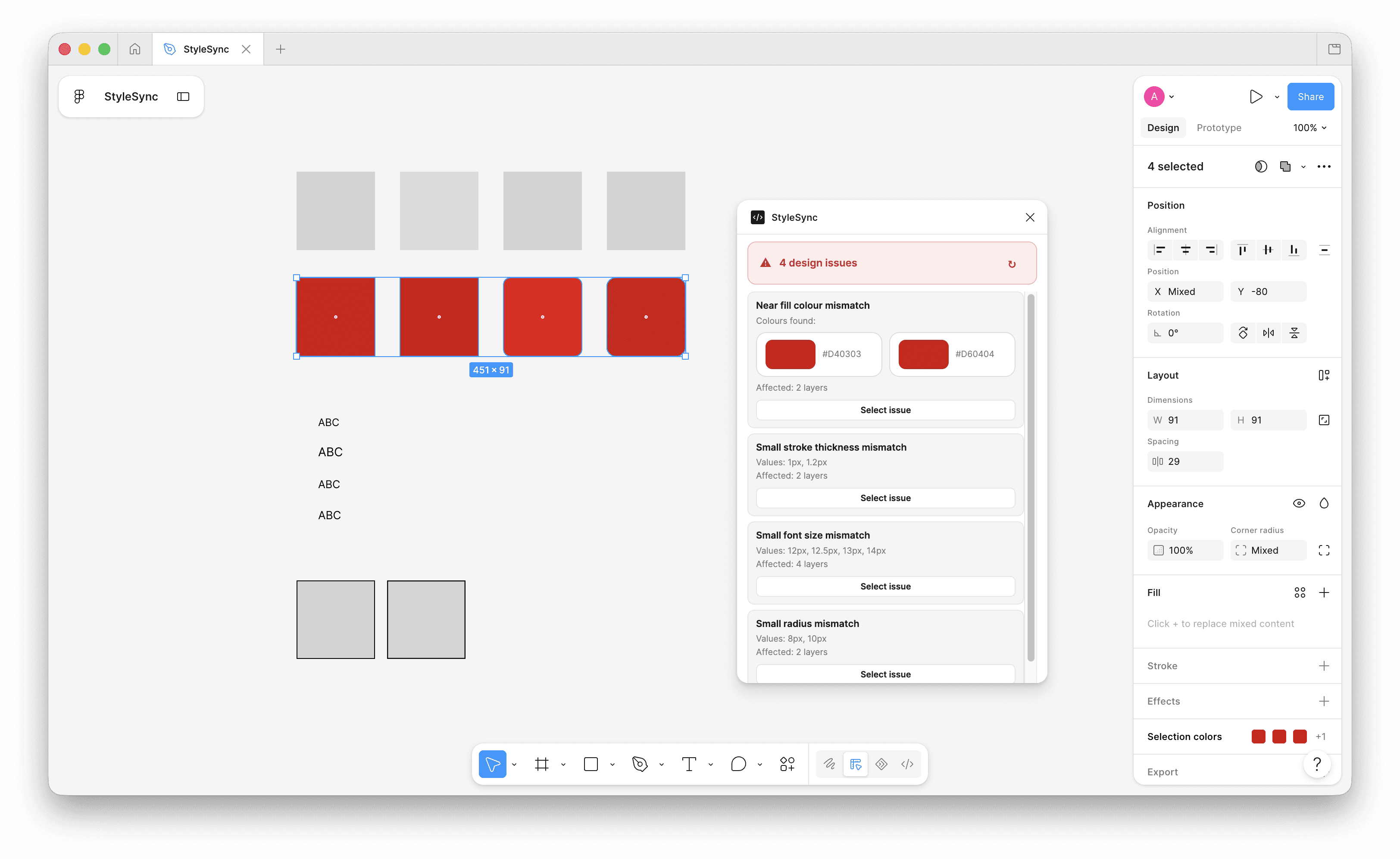
StyleSync and OneButton started from small workflow problems I repeatedly encountered while designing in Figma. When I couldn’t find plugins that solved them in the way I needed, I designed and built my own. Both are now published, used in my daily workflow, and have reached 8 users within their first month.
Problem
Small repetitive tasks were slowing down the workflow.
While working in Figma, I kept encountering repetitive actions that interrupted otherwise simple design tasks. Existing plugins either didn’t solve these specific problems or introduced more complexity than needed. Rather than continuing with manual workarounds, I explored whether small, focused tools could remove that friction entirely.
Approach
Start with the friction, then remove everything unnecessary.
I broke each problem down into the smallest useful interaction, explored how it could fit naturally into Figma, and designed each plugin to require as little learning as possible. I then built, tested and refined them through my own daily use before publishing them for other designers.
Solution
Small tools built to do one thing well.
StyleSync and OneButton turn repetitive Figma actions into simple, focused interactions. Each plugin was deliberately kept lightweight, solving a specific workflow problem without adding unnecessary features or complexity, allowing designers to stay focused on their work.

I mapped the repetitive actions in my own Figma workflow and identified where existing tools were adding unnecessary clicks. This helped define two focused problems worth solving rather than building feature-heavy plugins.

StyleSync was designed to make applying and managing styles faster, while OneButton simplified repetitive actions into a single interaction. Both were intentionally designed to feel lightweight and familiar inside Figma.

I took both plugins from idea through design and development, then introduced them into my own daily workflow. Real usage helped uncover improvements quickly, while publishing them allowed other designers to start using them too.
Key Decisions
Small decisions. A simpler experience.
1
Solve one problem exceptionally well
Each plugin was deliberately focused on a single workflow problem rather than growing into a larger collection of loosely related features.
2
Feel native to Figma
Interactions, terminology and visual patterns were designed to feel familiar, reducing the learning curve and allowing the plugins to fit naturally into existing workflows.
3
Build from real daily use
I used both plugins in my own workflow, allowing real repeated usage to reveal friction and guide improvements before and after publishing.
Outcome
From personal problem to published products.
Both plugins moved from everyday workflow frustrations to working tools published for the Figma community. Within their first month, StyleSync and OneButton reached 8 users, while becoming tools I continue to use and improve through my own daily design work.



Results
2
Figma plugins
8
Users within the first month
Daily
Used in my own design workflow
2
Real workflow problems turned into tools
And Beyond
Building the tools I wanted to use.
Publishing the plugins turned personal workflow improvements into tools other designers could use too. Their continued use gives me a direct feedback loop to identify improvements, refine the experience and explore new opportunities where small tools can remove friction from everyday design work.


